Before an app install
Save a restore point before new app code touches theme sections or snippets.
ThemeMate Auto Backup for Shopify
A polished backup workspace for Shopify merchants and agencies: automatic daily backups, manual restore points, version comparison, guided restore, backup history, support tickets, documentation, and a clear path back when a theme update breaks something important.
Built for real theme risk
Shopify themes change constantly: design edits, app embeds, snippets, campaign banners, developer handoffs, and urgent fixes. ThemeMate turns those risky moments into recoverable restore points.
Save a restore point before new app code touches theme sections or snippets.
Protect banners, landing pages, and custom theme settings before the next sale starts.
Give the merchant a clean backup trail before another developer starts work.
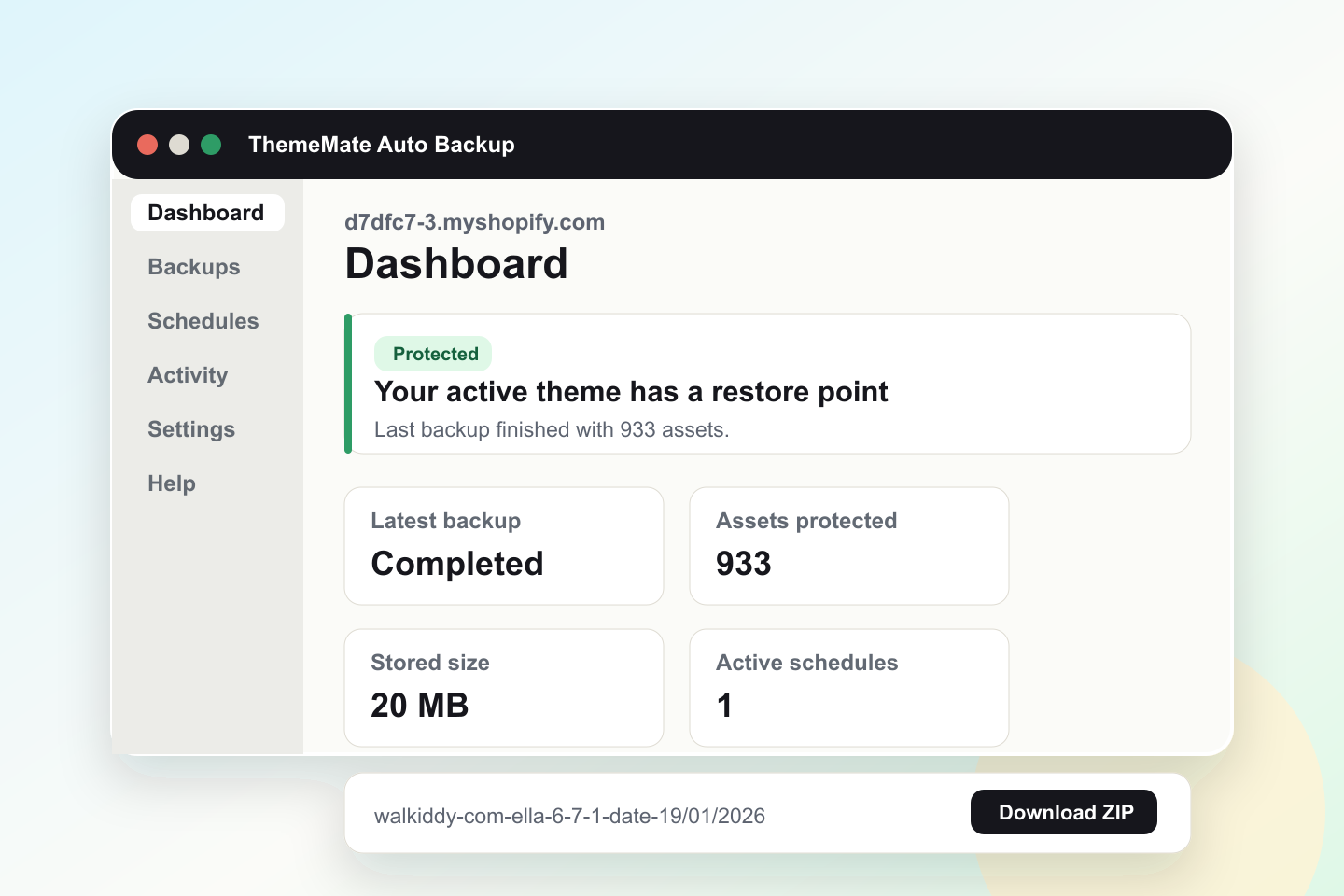
d7dfc7-3.myshopify.com
Last backup finished with 933 assets.
Where merchants feel the pain
Strong backup products explain the risk first, then the feature. ThemeMate now tells that story for theme-specific problems, without pretending to be a full-store backup product.
Merchants often update themes after months of edits. ThemeMate gives them a dated restore point before that update becomes a live-store emergency.
New app installs can touch theme files or change how storefront sections behave. A manual backup before install makes the change reversible.
Agencies and store owners get a shared history of theme snapshots before handoff, redesign, or custom Liquid work.
Before a sale, bundle launch, landing page edit, or seasonal banner update, teams can create a restore point and continue with confidence.
Product features
A daily schedule is enabled for each shop so the first restore point is not left to chance.
Run a backup before a theme edit, app install, redesign, campaign launch, or agency handoff.
Completed backups can be downloaded as Shopify theme ZIP files and imported as draft themes.
Merchants can review older snapshots, dates, file counts, status, and stored size.
A lightweight comparison view helps teams understand what changed between theme snapshots.
Customer-facing logs focus on useful events: backup started, completed, failed, restored, and scheduled.
Pause, run, delete, and manage schedules without duplicate backup jobs cluttering the account.
A help page gives merchants a proper way to ask for support from inside the product experience.
Guides explain restore, schedule, download, comparison, and billing workflows in plain merchant language.
Downloadable ZIPs make it simple for teams to keep copies in their own cloud drive or client archive.
Trust content explains what is backed up, what is not backed up, and how restore access is handled.
The product and marketing structure can support English, Turkish, and additional merchant languages.
The product message stays honest: ThemeMate protects theme files and settings, not products, orders, or customers.
Backups are presented as practical restore points merchants can understand, download, and act on.
Use snapshots to document the theme state before a developer, freelancer, or agency starts work.
One plan, a short Shopify billing trial, and daily protection after setup keep the offer easy to understand.
Why the offer works
ThemeMate takes the strongest market patterns and narrows them to one clear promise: protect the Shopify theme layer before changes go wrong.
Backup products win trust by promising protection from day one. ThemeMate mirrors that pattern with daily scheduling after setup.
Merchants need dates, statuses, counts, and older restore points so they can find the right backup from last week or last month.
Instead of surprising the live theme, ThemeMate explains the safer path: download, import as draft, preview, then publish.
A security page, privacy link, docs, and support form make the product feel more serious before a merchant installs it.
Product showcase
The marketing page now shows what merchants will actually use: a dashboard, backup history, restore guidance, activity events, and support entry points.
Filter by date, download ZIP, open restore guidance.
Spot changed files before choosing a restore point.
Ask for help from inside the app experience.
Product screens
Dashboard
A quick health view for the active theme, latest backup, protected assets, schedules, and next run.
Backups
Filter and review snapshots, then download the restore ZIP or open the guided restore flow.
Schedules
Default daily protection plus manual controls for teams that need a different rhythm.
Activity
Simple operational events for merchants, without overwhelming them with internal diagnostics.
Feature depth
Merchants should understand exactly why ThemeMate is different from a simple file export. These pages and features give the product a more complete commercial story.
Compare backup versions at a basic level so a team can understand what changed before choosing a restore point.
Browse older backups by date, theme, and status instead of being limited to the latest snapshot.
Keep restore safe by downloading a ZIP, importing it as a draft theme, previewing, then publishing manually.
Downloaded backup ZIPs can be saved by the merchant or agency in Google Drive, Dropbox, or another archive tool.
A real contact and ticket path gives merchants a route to help without hunting for an email address.
Clear security and privacy explanations help merchants understand the backup scope before installing.
Backup scope
A simple coverage table helps avoid confusion during Shopify review and makes the product easier for merchants to trust.
Sections, snippets, templates, assets, config, locales, and theme code are included in completed snapshots.
Storefront settings are captured as part of the theme export so teams can recover the look and setup.
Backup history helps merchants find a previous snapshot instead of only seeing the newest backup.
ThemeMate is intentionally focused on Online Store theme protection, keeping the promise clear and review-safe.
How it works
The app sends merchants to the Shopify-approved billing flow with a 3-day free trial.
After setup, the active theme is synced and a daily backup schedule is created automatically.
Teams can create an extra restore point before editing theme files or adding new app code.
Download the backup ZIP, import it as a draft theme in Shopify, preview it, then publish when ready.
Knowledge base
Backup apps with clear docs feel more mature. ThemeMate now points merchants to restore, schedule, comparison, billing, and agency handoff guidance in plain language.
What the app captures, when daily schedules run, and how manual backups fit into theme work.
Download the ZIP, import it as a draft theme, preview it in Shopify, and publish only after review.
Use the comparison view to understand changed theme files before choosing a restore point.
Create a clean snapshot before an outside team edits code, settings, sections, or campaign content.
Safe restore model
Restore is intentionally guided. The merchant downloads a backup ZIP, imports it as a draft theme in Shopify, previews the result, then publishes when the team is confident.
Open Shopify listingTrust and support
Why ThemeMate
A small monthly safety layer before theme edits, app installs, and campaign launches.
A focused theme backup product instead of a heavy full-store backup suite.
A merchant-friendly restore model that avoids automatic live-theme overwrites.
A stronger story for agencies that need proof of what changed and when.
Affiliate and agency partners
ThemeMate is easy to recommend before theme edits, app installs, migrations, redesigns, and campaign launches. Agencies can position it as a small monthly safety layer that prevents expensive theme recovery work. The Impact partner link can be added as soon as the account is ready.
Pricing
No confusing tiers on the marketing site. Merchants approve the app in Shopify, receive a 3-day free trial, and can manage billing from their Shopify account.
Questions
No. The restore flow is intentionally safe: download the backup ZIP, import it as a draft theme, preview it in Shopify, and publish only when it looks correct.
ThemeMate focuses on Shopify Online Store theme files and theme settings. It is not an order, product, customer, or full-store backup product.
Yes. Completed backups can be downloaded as ZIP files, so a merchant or agency can keep a copy in their own cloud drive, client folder, or internal archive.
Yes. The product is designed around backup history, filters, and older restore points so merchants can find the right snapshot instead of only seeing the latest backup.
The partner program is being prepared for Impact. Until the final tracking account is active, agencies and creators can register interest through the contact page.
Protect the next theme edit